

A business leader recently questioned an annual backup expense. The organization had paid for backups year after year without ever needing to recover from a major loss. From a budget perspective, it was tempting to ask: why keep paying for something we never use?
That question deserves an answer. Backups are a lot like insurance: the best outcome is to pay for the protection and never face the disaster that makes it necessary. But unlike a policy alone, a properly designed backup and disaster recovery program can give an organization the practical means to restore its data, applications and operations.
Measure the cost of recovery, not just the cost of backups
The annual backup bill is visible and predictable. The cost of a major failure is neither. A data loss can affect financial records, customer information, engineering work, production history, application databases and the configuration of critical equipment. Some information may be impossible to reconstruct.
In an industrial facility, lost production may cost tens of thousands of dollars per hour—or considerably more, depending on the operation. Even where lost data can be recreated, the time required to rebuild systems, validate applications and return to production can exceed the cost of years of protection.
The better budget question is: how much downtime and data loss can the organization actually tolerate?
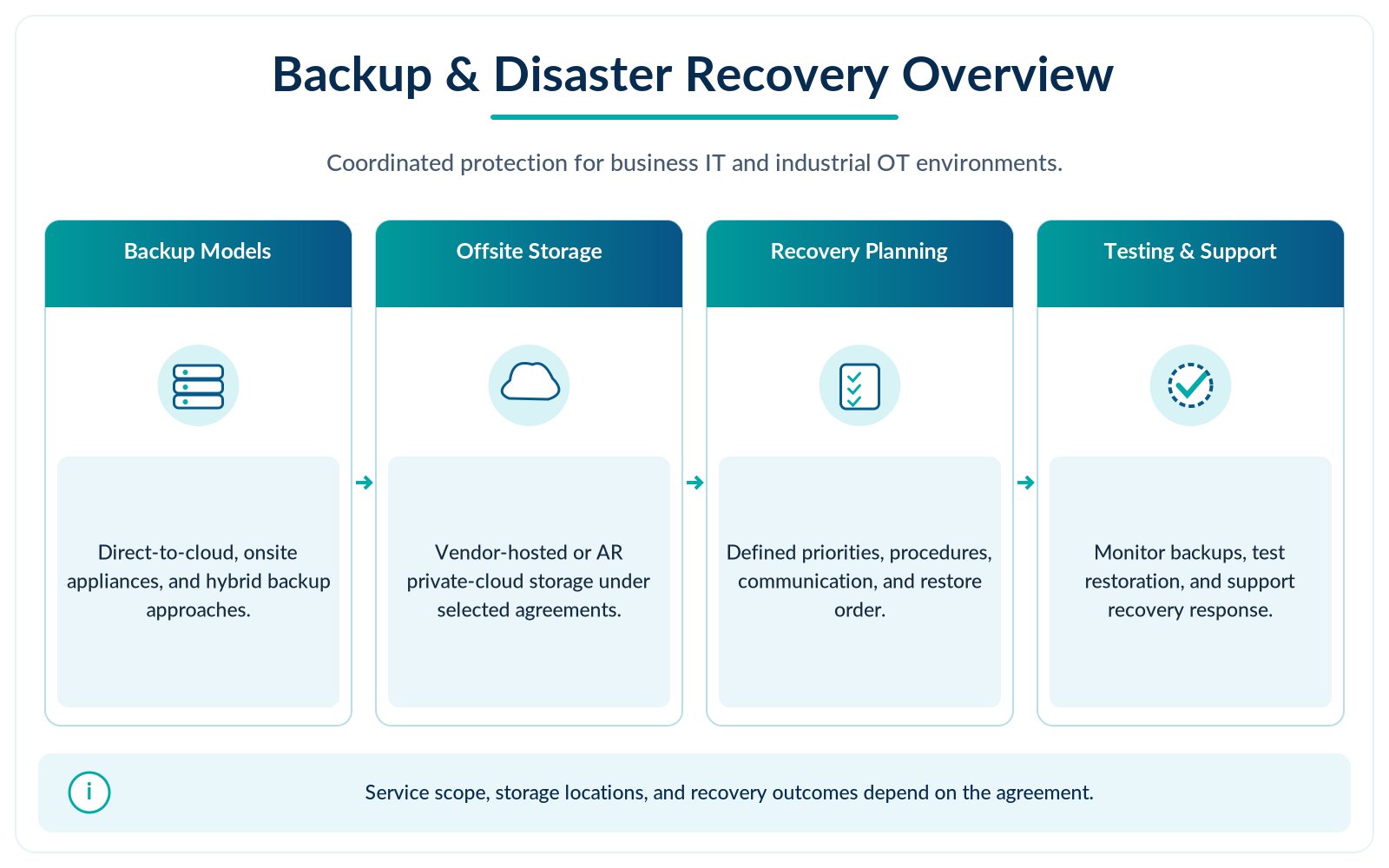
When Hurricane Helene destroyed a server room
Hurricane Helene provided a real-world test of that principle. At an industrial facility supported by Automated Results, approximately six feet of floodwater entered the server room. Servers and other electronic equipment were submerged and destroyed. Onsite backup tapes were also underwater. The facility had a Datto backup and disaster recovery solution managed by Automated Results.
The facility’s offsite Datto backups made a different recovery path possible. Rather than waiting for the damaged server room to be rebuilt and new physical hardware to arrive, the recovery team started virtual servers from backup images in a cloud recovery environment. Once internet connectivity was restored, a site-to-site VPN connected the plant to the recovery environment, making its restored IT services available remotely.
As rooms were repaired and replacement infrastructure was installed, workloads could be migrated back to onsite VMware ESXi virtualization hosts. The offsite recovery process minimized data loss and helped ensure that IT was not the limiting factor in the facility’s return to production.
This was not simply a successful file restore. It was an example of why recovery planning must account for the loss of an entire site—not just a failed drive or deleted document. The same business continuity principles apply to small and midsize businesses, professional offices and other managed IT customers. Automated Results supports similar image-based disaster recovery strategies using Datto and Axcient backup solutions, where the selected service, protected workloads, networking and recovery configuration permit. Recovery capabilities and times must be validated for each customer’s environment. Learn about our Business IT Backup & Recovery services.
When a storage mistake took down industrial applications
Not every disaster involves a storm or a cyberattack. At another industrial facility in Europe, a storage array supporting the manufacturing execution system (MES) environment was mistakenly taken apart during infrastructure work. The disruption affected the AspenTech IP.21 process historian, advanced process control (APC) applications and other MES network servers.
Automated Results had backups at its offsite data center, but the plant’s internet connection at the time was approximately 1 Mbps. The historian alone represented more than a terabyte of data. Sending that volume over the available connection was not a practical way to meet the recovery need.
Recovery therefore used more than one delivery method. An initial set of essential backups was transferred to a physical drive for restoration of priority systems. For the much larger historian dataset, the team prepared a drive containing a virtualized IP.21 server with its historical data and shipped it overnight to Germany for onsite recovery.
The site has since upgraded to faster internet connectivity, making large network transfers a more practical recovery option. But a physical-media recovery path remains important when the available bandwidth, data volume or outage conditions make electronic transfer impractical. Secure handling, encryption and verified delivery are critical whenever recovery media must travel.
The lesson: having the data is only part of recovery. A useful plan identifies how to move that data—or a complete recoverable system—to where it is needed, within the time the operation can tolerate.
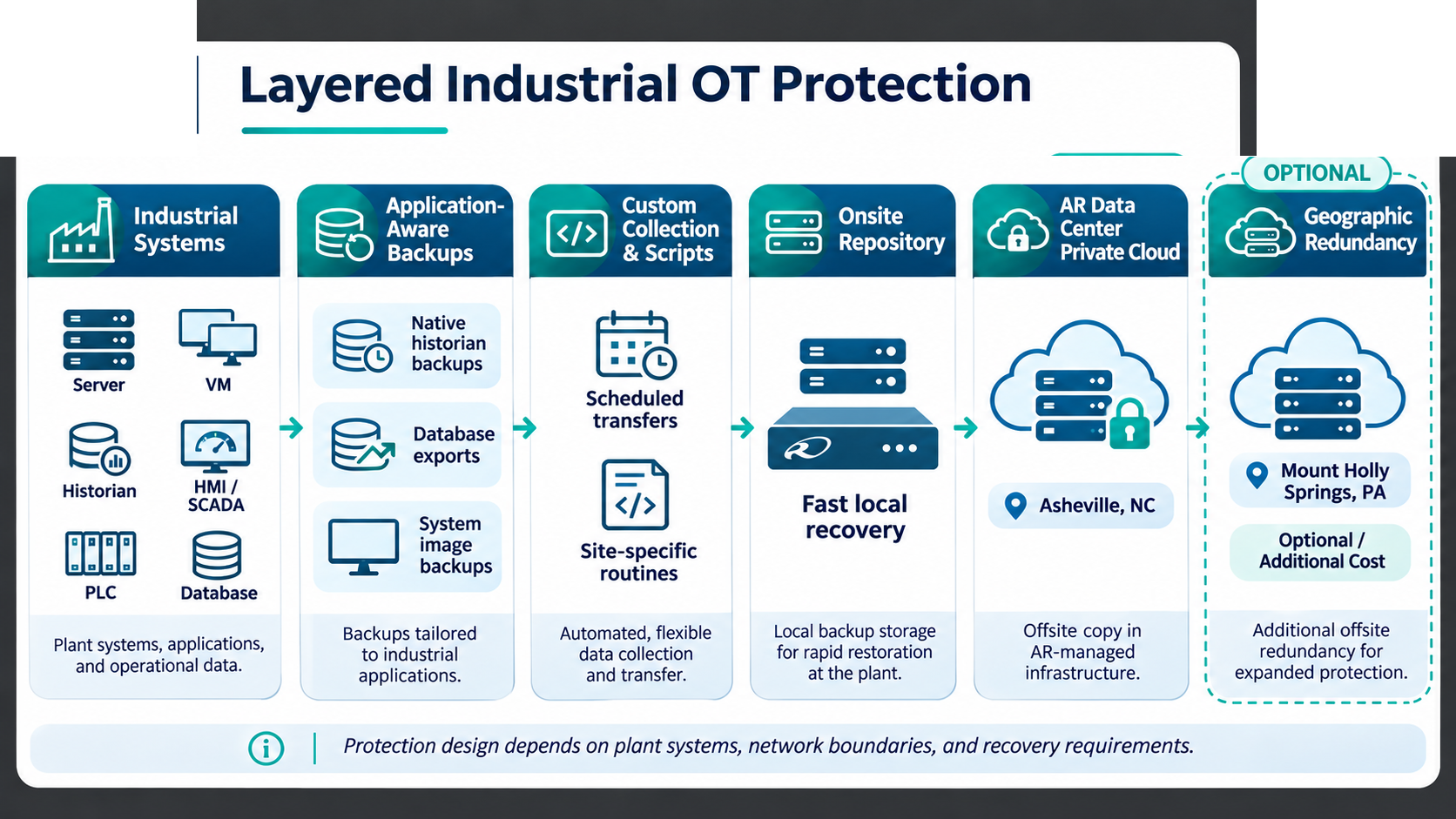
A backup is not the same as a recovery plan
Completing a backup job does not prove that a complete service can be recovered within the time the business needs. A sound strategy defines two measures:
- Recovery Point Objective (RPO): the maximum acceptable period of data loss, measured backward from a disruption.
- Recovery Time Objective (RTO): the target time to restore a service or business function after an interruption.
Those objectives determine backup frequency, retention, network capacity, recovery infrastructure and testing. They must also account for application dependencies, authentication, networking and access to the recovery environment. A backup retained safely but impossible to restore promptly may not meet the business requirement.
Backups are only useful if they can be restored
A successful backup does not necessarily mean a successful recovery. Backup software may report that jobs completed, but a real restoration can fail because of damaged media, missing application dependencies, incompatible hardware or software versions, unavailable credentials, incomplete database backups or an undocumented recovery sequence.
That is why restoration planning and testing deserve the same attention as the backups themselves. At a minimum, organizations should establish an annual recovery testing cycle for critical systems, with more frequent verification where business risk, operational change or regulatory requirements warrant it. Tests should be based on recovery objectives and documented results, not just a successful status indicator in a backup console.
- Bench or isolated restore testing: restore representative files, databases, virtual machines and application workloads into an isolated test environment without disrupting production. Confirm that the data is usable and that required services actually start.
- Application-aware validation: verify that MES, APC and historian applications—including AspenTech IP.21 and AVEVA PI where applicable—can access restored databases, archives, configurations, interfaces and dependencies, rather than merely confirming that a VM boots.
- Tabletop exercises: walk IT, OT, operations, management and external providers through realistic outages, clarifying decision authority, communications, recovery priorities and dependencies before a real incident.
- Full recovery exercises: periodically rehearse realistic scenarios, including offsite or cloud recovery, network and VPN restoration, and recovery when local backup infrastructure is unavailable.
- Documented results and remediation: measure actual recovery time and recovered data points against RTO and RPO targets, record gaps and assign corrective actions for retesting.
Testing need not create unnecessary risk for live industrial systems. Bench testing and carefully scoped exercises allow a team to validate its procedures in controlled conditions; production-impacting tests require change management and appropriate operational approval.
The most expensive time to discover that a backup cannot be restored is during an actual emergency. A reliable backup and disaster recovery program must prove—not simply assume—that recovery will work.
Protect backups from the same disasters—and attackers—that threaten production
Modern ransomware attacks may deliberately seek out backup repositories and delete, encrypt or otherwise compromise recovery points. That is why backup protection should be layered:
- Onsite: convenient recovery from routine failures when the facility remains operational.
- Offsite: a geographically separate recovery copy if the original site or server room is lost.
- Offline or appropriately immutable: a copy resistant to attacks that can reach and alter online systems, with appropriately restricted administration.
Encryption, access controls, monitoring, documented retention, and regular restore tests are also essential. “Cloud backup” by itself is not proof of isolation: administrators and attackers with sufficient access may still be able to compromise some cloud-hosted copies. CISA advises keeping offline, encrypted backups and testing restoration regularly.
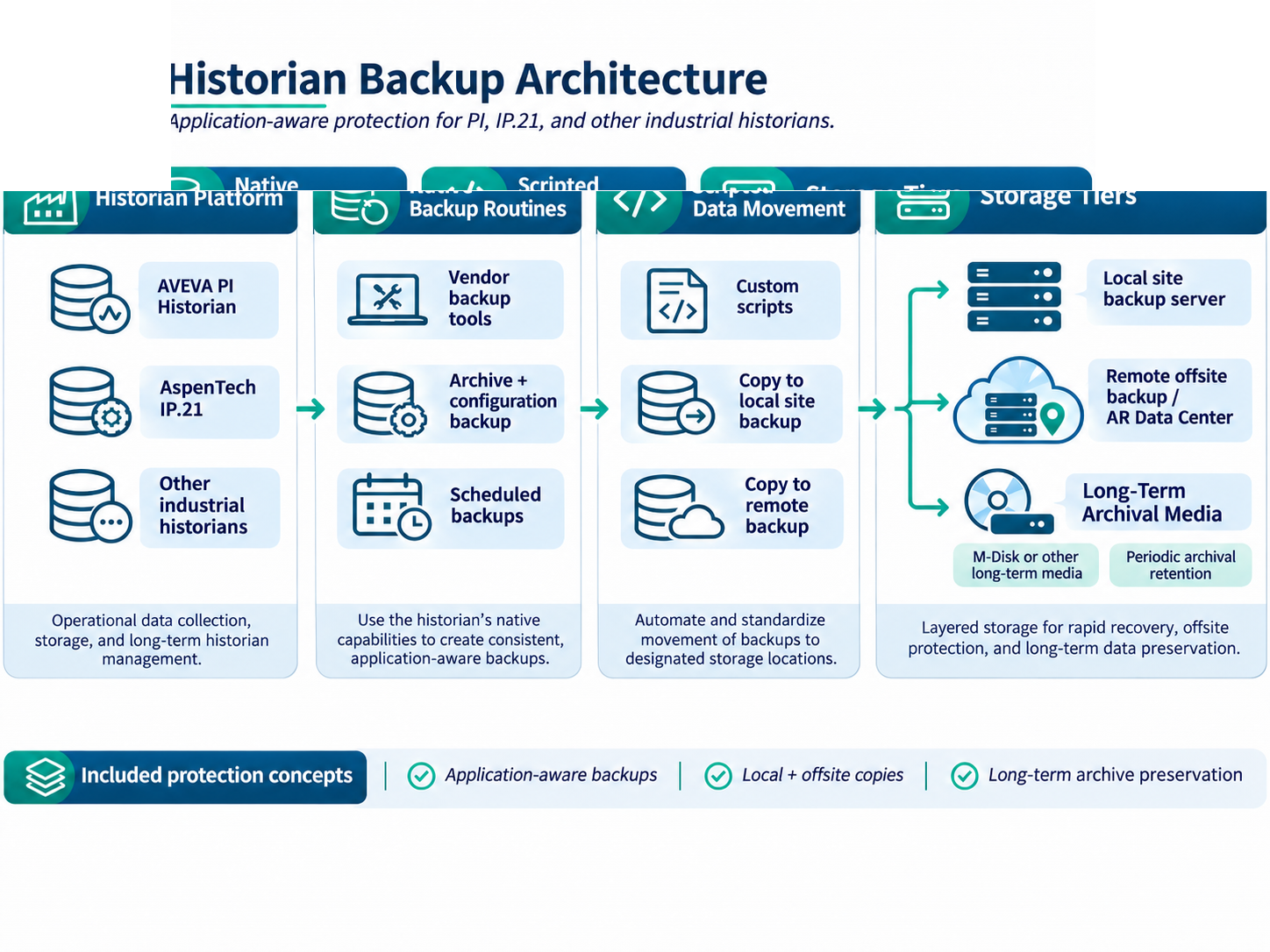
Industrial historian archives: a second reason backups matter
Industrial historians such as AVEVA PI and AspenTech IP.21 often contain years of process data. Recent history may be valuable for daily operations and troubleshooting, while older archives may be needed only for investigations, process comparisons or compliance audits.
Keeping every historical archive mounted on a production historian may create unnecessary storage, administration and performance burdens. With an appropriate archive-preservation strategy, older data can be retained on protected secondary or offline media and restored to a suitable historian environment when required. This must be planned around the historian’s archive format, version compatibility, indexing behavior, integrity verification and the organization’s access-time requirements.
Environmental monitoring data is a particularly important example. Applicable permits and regulations may require records to be retained for years, even when their immediate operational value has declined. The retention period depends on the permit, jurisdiction and record type; a backup schedule should not substitute for reviewing those requirements. Historic backups can also help investigate changes to applications, configurations and data over time—provided appropriate versioning and retention have been designed into the system.
Backup and recovery are recognized cybersecurity practices
Backups are not only operational best practice. They appear explicitly in recognized security frameworks:
- CISA: the ransomware guidance calls for offline, encrypted backups and routine recovery testing; its Cross-Sector Cybersecurity Performance Goals address separately stored and tested system backups, including critical OT configurations.
- NIST: SP 800-53 includes CP-9 (System Backup) and CP-10 (System Recovery and Reconstitution); the NIST Cybersecurity Framework 2.0 also addresses verifying recovery assets and restored systems.
- ISA/IEC 62443: industrial control system requirements SR 7.3 and SR 7.4 address backup capabilities and recovery to a known secure state.
Whether a particular control is legally mandatory depends on the organization’s sector, contractual obligations, applicable regulations and adopted security baseline. These frameworks provide a valuable basis for evaluating backup design, but they are not a single universal backup law.
Questions to ask before cutting the backup budget
- Which data, applications, historian archives and configurations could we not afford to lose?
- How much business or production downtime can we tolerate, and what does each hour cost?
- Are our backups recoverable if the whole building, network or server room is unavailable?
- Can ransomware or a compromised administrator alter every copy?
- Have we performed and documented annual restore tests, isolated bench tests and tabletop exercises—not merely checked that backup jobs ran?
- Do retention policies satisfy business, historical and regulatory requirements?
Protection is valuable before the day it is needed
No organization wants to experience a flood, fire, cyberattack or catastrophic hardware failure. But a backup strategy should be measured by the losses it can prevent and the recovery options it preserves—not by the number of times the organization has already had to use it.
At Automated Results, we work across business IT, industrial OT systems, application environments and specialty data center hosting to build backup strategies around what customers actually need to recover. The goal is straightforward: protect the information, restore essential services and help the business return to work.
For business IT and MSP customers, explore Business IT Backup & Recovery and Business IT Support. For specialized industrial environments, see Industrial OT Backup and Historian Archive Preservation. Our Backup and Disaster Recovery services address both business and industrial requirements.
References and further reading
- CISA / MS-ISAC Ransomware Guide
- CISA Cross-Sector Cybersecurity Performance Goals
- NIST SP 800-53 backup and recovery controls
- ISA/IEC 62443 control mappings
Could your business recover from its backups?
Do you know how long recovery would take, how much data you could lose, and whether your systems have actually been restored in a test? Whether you have questions about your existing backups, want to understand your recovery options, or would like help reviewing a backup and recovery plan, we’re glad to talk. Automated Results works with organizations of all sizes, from small business networks to complex industrial environments.
Recent Comments